pragma
October 11, 2023, 10:57pm
1
Hi guys,
It seems that there’s some bug when I try to install LN, since there’s no error message after I click the Install button:
It just stays like this for hours:
<INSTALLING…> This may take a few minutes
Any suggestion?
Cheers,
Pragma
Hi @pragma
pragma
October 29, 2023, 8:16pm
3
I waited for hours and nothing @crucifix .
Also I am unable to install any other app.
The screen just says… “INSTALLING…” This may take a few minutes.
And nothing happens and nothing is installed.
I already restarted Umbrel, but the issue persists
I gave up.
Its sad to see that there is no response from Umbrel devs/community for more than 2 weeks.
I’m just hobbyist trying to help.
You can try to check for answer in this posts:
Umbrel Community Discord using keywords re…
pragma
October 29, 2023, 10:18pm
5
Thanks @crucifix for the help,
I think I have enough storage (~1.3TB free) and RAM (~11GB free):
My umbrelOS Version 0.5.4
Cheers
Hi @pragma sorry to hear that, we can try another way and see how we go:
First- SSH into your device
SSH (Secure Shell) is a way to access and control a device, such as your Umbrel server running on a Umbrel Home or Raspberry Pi, via the command line. To access Umbrel via SSH, follow these steps:
Open a terminal window on your computer. On macOS, you can open the Terminal app that’s installed by default on every Mac. On Windows, you can open Command Prompt or the PowerShell app.
Type in the following command* and press the Enter key:ssh -t umbrel@umbrel.local*In the command given above, you can replace umbrel.local with the local IP of your Umbrel if you prefer. If you are using PowerShell on Windows 10, you may need to run ssh umbrel@umbrel instead of the command given above.
You will then be prompted to enter your password. This is the same password you use to access your Umbrel through a browser. The default password before you have created an account on your Umbrel is moneyprintergobrrr on Raspberry Pi, and umbrel on Umbrel Home. You will not be able to see your password as you type it into the terminal. Once you have typed in your password, press the Enter key.
This will established an SSH connection to your Umbrel server. You can now begin using the command line interface to perform various actions and troubleshoot issues that require SSH.
then try installing lightning from the command line
~/umbrel/scripts/app install lightning
Let me know what kind of output you get with that!
pragma
October 31, 2023, 7:44pm
7
Hi @smolgrrr , it seems “permission denied”
PS: I also tried to Start the Troubleshoot on settings, but got the following message:
Interesting, can you try these instead
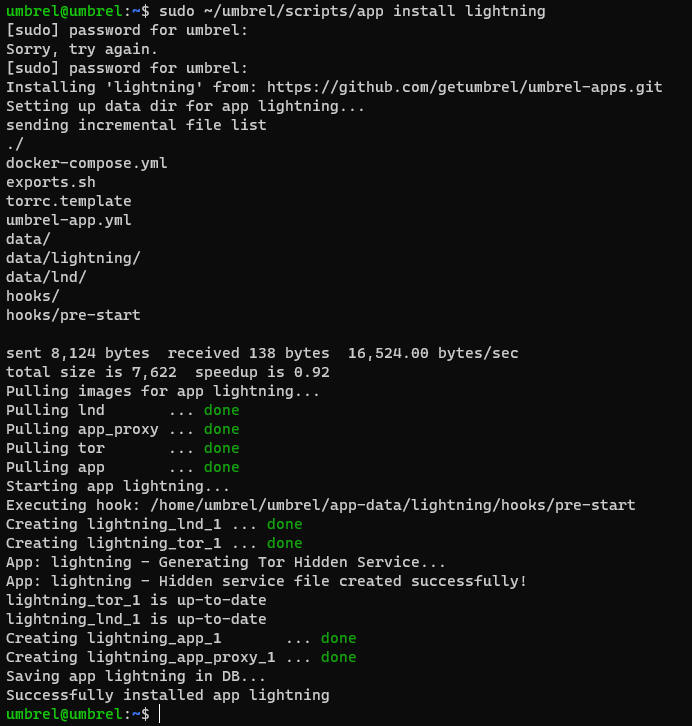
sudo ~/umbrel/scripts/app install lightning
and then
sudo ~/umbrel/scripts/debug
pragma
November 1, 2023, 4:14pm
9
Well @smolgrrr , it worked!
Thank you very much!
Now I need to configure it properly…


 enjoy
enjoy