### Author:  [@pragma](https://community.umbrel.com/u/pragma)
#### Post date: [October 11, 2023, 10:57pm UTC](https://community.umbrel.com/t/bug-unable-to-install-lightning-node/13920/1 "2023-10-11T22:57:45Z")
Hi guys,
It seems that there’s some bug when I try to install LN, since there’s no error message after I click the Install button:

It just stays like this for hours:
**\**
_This may take a few minutes_
Any suggestion?
Cheers,
Pragma
---
### Author:  [@crucifix](https://community.umbrel.com/u/crucifix)
#### Post date: [October 28, 2023, 4:38pm UTC](https://community.umbrel.com/t/bug-unable-to-install-lightning-node/13920/2 "2023-10-28T16:38:25Z")
Hi @pragma
Do you have any update?
You was able to install LN node?
It coul’d take some time - few minutes to install it.
---
### Author:  [@pragma](https://community.umbrel.com/u/pragma)
#### Post date: [October 29, 2023, 8:16pm UTC](https://community.umbrel.com/t/bug-unable-to-install-lightning-node/13920/3 "2023-10-29T20:16:15Z")
I waited for hours and nothing @crucifix.
Also I am unable to install any other app.
The screen just says… “INSTALLING…” This may take a few minutes.
And nothing happens and nothing is installed.
I already restarted Umbrel, but the issue persists 😕
I gave up.
---
### Author:  [@crucifix](https://community.umbrel.com/u/crucifix)
#### Post date: [October 29, 2023, 9:53pm UTC](https://community.umbrel.com/t/bug-unable-to-install-lightning-node/13920/4 "2023-10-29T21:53:35Z")
Its sad to see that there is no response from Umbrel devs/community for more than 2 weeks.
I’m just hobbyist trying to help.
Are you sure you have enough memory on SSD?
You have to have your Bitcoin node fully synced, that could be an issue if you don’t, but you’ll have also an error message if thats the case.
You can try to check for answer in this posts:
There is also link to Umbrel’s Telegram community, if you are not there yet.
> [@Official umbrelOS Troubleshooting Guide and FAQ](https://community.umbrel.com/t/official-umbrel-troubleshooting-guide-and-faq/9873):
>
> Overview This guide provides troubleshooting steps and answers to frequently asked questions for umbrelOS (updated as of umbrelOS 1.2.1) Encountering an issue with your umbrelOS server? We’ve put together a list of troubleshooting steps to help you resolve common problems. Step 1: Take a look through the guide below to see if you can find a solution to your issue. Step 2: If you cannot find a solution in this guide, search this forum and the official [Umbrel Community Discord](https://discord.gg/efNtFzqtdx) using keywords re…
> [@List of Video Tutorials to start learning (nodes related)](https://community.umbrel.com/t/list-of-video-tutorials-to-start-learning-nodes-related/272):
>
> Here will try to keep updated a list of video tutorials and Youtube channels about how to install, configure, use, manage LN nodes and apps related. This will be very helpful for noobs. Umbrel Tutorials: [How To Assemble Umbrel Using a Raspberry Pi](https://youtu.be/fppmhqjqh2E) - by BTC Sessions [How to use Bitcoin Node and Lightning Node on Umbrel (NEW)](https://www.youtube.com/watch?v=Fa9AvF4jk1o) — by BTC Sessions [How To Run A Bitcoin Lightning Network Node (node management)](https://www.youtube.com/watch?v=KItleddMYFU) - by BTC Sessions [How to install Umbrel on Ubuntu](https://www.youtube.com/watch?v=EJuUVKuEwNQ) Umbrel Tutoriales en Español [Como i…](https://youtu.be/Nh23rbT8yHA)
---
### Author:  [@pragma](https://community.umbrel.com/u/pragma)
#### Post date: [October 29, 2023, 10:18pm UTC](https://community.umbrel.com/t/bug-unable-to-install-lightning-node/13920/5 "2023-10-29T22:18:46Z")
Thanks @crucifix for the help,
I think I have enough storage (~1.3TB free) and RAM (~11GB free):

My umbrelOS Version 0.5.4
Cheers
---
### Author:  [@smolgrrr](https://community.umbrel.com/u/smolgrrr)
#### Post date: [October 30, 2023, 2:00am UTC](https://community.umbrel.com/t/bug-unable-to-install-lightning-node/13920/6 "2023-10-30T02:00:09Z")
Hi @pragma sorry to hear that, we can try another way and see how we go:
First- SSH into your device
> [@Official Umbrel Troubleshooting Guide and FAQ](https://community.umbrel.com/t/official-umbrel-troubleshooting-guide-and-faq/9873/1):
>
> SSH (Secure Shell) is a way to access and control a device, such as your Umbrel server running on a Umbrel Home or Raspberry Pi, via the command line. To access Umbrel via SSH, follow these steps:
>
> 1. Open a terminal window on your computer. On macOS, you can open the Terminal app that’s installed by default on every Mac. On Windows, you can open Command Prompt or the PowerShell app.
> 2. Type in the following command\* and press the `Enter` key:`ssh -t umbrel@umbrel.local`\*In the command given above, you can replace `umbrel.local` with the local IP of your Umbrel if you prefer. If you are using PowerShell on Windows 10, you may need to run `ssh umbrel@umbrel` instead of the command given above.
> 3. You will then be prompted to enter your password. This is the same password you use to access your Umbrel through a browser. The default password before you have created an account on your Umbrel is `moneyprintergobrrr` on Raspberry Pi, and `umbrel` on Umbrel Home. You will not be able to see your password as you type it into the terminal. Once you have typed in your password, press the `Enter` key.
>
> This will established an SSH connection to your Umbrel server. You can now begin using the command line interface to perform various actions and troubleshoot issues that require SSH.
then try installing lightning from the command line
> ~/umbrel/scripts/app install lightning
Let me know what kind of output you get with that!
You can also generate troubleshooting logs by going to the settings dashboard on your Umbrel home-page and pressing ‘START’ under troubleshooting
---
### Author:  [@pragma](https://community.umbrel.com/u/pragma)
#### Post date: [October 31, 2023, 7:44pm UTC](https://community.umbrel.com/t/bug-unable-to-install-lightning-node/13920/7 "2023-10-31T19:44:32Z")
> [@smolgrrr](#):
>
> ~/umbrel/scripts/app install lightning
Hi @smolgrrr , it seems _“permission denied”_

PS: I also tried to Start the Troubleshoot on settings, but got the following message:
“Error: Failed to fetch debug data.”
---
### Author:  [@smolgrrr](https://community.umbrel.com/u/smolgrrr)
#### Post date: [November 1, 2023, 1:54pm UTC](https://community.umbrel.com/t/bug-unable-to-install-lightning-node/13920/8 "2023-11-01T13:54:06Z")
Interesting, can you try these instead
> sudo ~/umbrel/scripts/app install lightning
and then
> sudo ~/umbrel/scripts/debug
---
### Author:  [@pragma](https://community.umbrel.com/u/pragma)
#### Post date: [November 1, 2023, 4:14pm UTC](https://community.umbrel.com/t/bug-unable-to-install-lightning-node/13920/9 "2023-11-01T16:14:05Z")
> [@smolgrrr](#):
>
> sudo ~/umbrel/scripts/app install lightning
Well @smolgrrr , it worked! 🥹
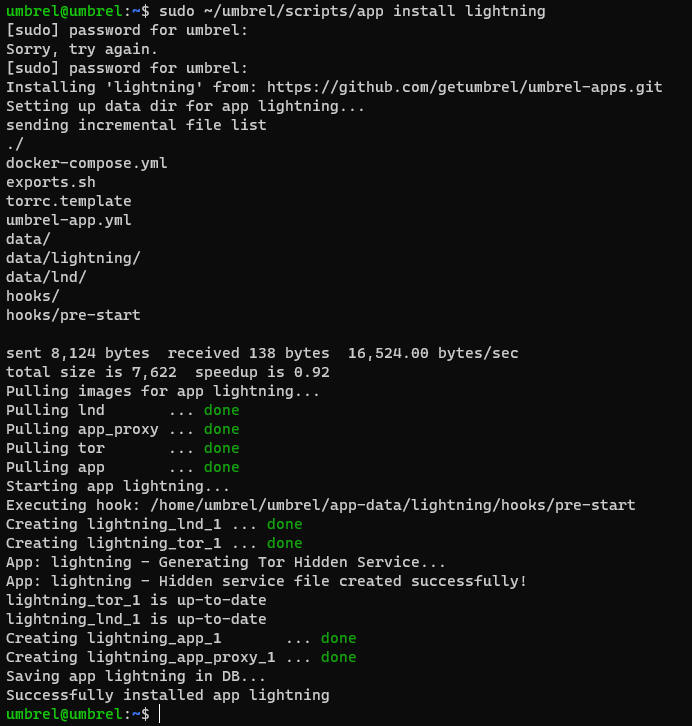
Thank you very much!
Now I need to configure it properly…
---
### Author:  [@smolgrrr](https://community.umbrel.com/u/smolgrrr)
#### Post date: [November 2, 2023, 10:37am UTC](https://community.umbrel.com/t/bug-unable-to-install-lightning-node/13920/10 "2023-11-02T10:37:58Z")
🫂 enjoy